GitHub
Configure GitHub to remotely build Remote Falcon Images via GitHub Actions workflows.
-
This is recommended if you have less than 16 GB of RAM since the plugins-api and viewer images require a lot of RAM to initially build.
-
GitHub will do the heavy lifting of building images while allowing you to run the containers with less RAM.
-
The configure-rf script offers to configure GitHub and create a new private repository to run the GitHub Actions workflow to build the Remote Falcon Images and push them to GitHub Container Registry(GHCR).
-
The private repository is created from the remote-falcon-image-builder template repository which contains the workflows.
-
The repository is private so your images that are built with your custom arguments remain private as well.
-
This makes use of the sync_repo_secrets and run_workflow scripts.
-
sync_repo_secrets syncs build arguments from the .env to your private repos as secrets that are used in the workflow to build the images.
-
run_workflow syncs secrets to your repo and runs the build-all or build-container workflow.
-
build-all workflow only builds new images if manually run or if the scheduled run detects new commits from the RF repositories that do not currently exist in GHCR for your repository.
-
build-all workflow runs daily at 11:00 PM Central Time to check for any new updates from the RF repositories.
-
This allows you pull the images when new updates are available, provided your build arguments have remained the same.
Create GitHub account or sign in to existing account
- Create a new account here.
Note
The GitHub account is free along with GitHub Actions up to a certain amount.
Create Personal Access Token
-
Click this link or go to your profile icon on the top right
- Click Settings
- Click Developer settings
- Click Personal access tokens -> Tokens (classic)
-
Click Generate new token -> Generate new token (classic)
-
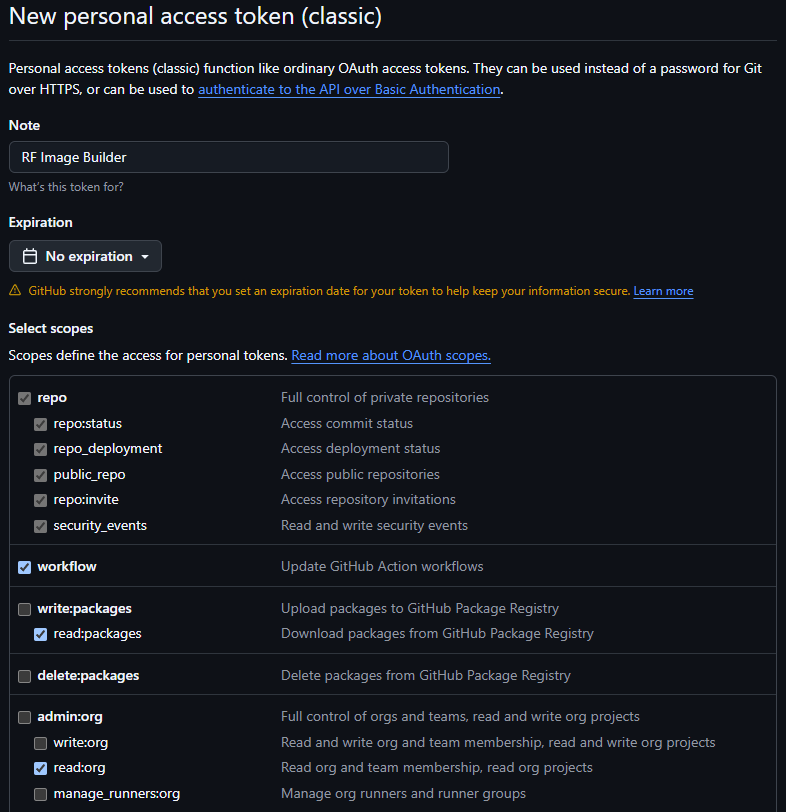
Enter Note:
RF Image Builder or similar -
Click Expiration: Select an expiration date or no expiration
-
Check the following boxes:
repo
workflow
read:packages
read:org
-
Click Generate token
-
Click the to copy your token and paste it in a notepad
-
Move onto the Remote Falcon installation and enter
Yat the question to update GitHub configuration after running the configure-rf script.